Do AI Dating Photos Look Like You? How to Check
Do AI dating photos look like you? Why some don't, how to get realistic ones, the red flags to zoom in on, and the honesty test before you post.
9 min read
In this article
Quick answer
Good AI dating photos can look like you, but not automatically. Resemblance comes mostly from your selfies (recent, sharp, evenly lit, unfiltered, a few angles) and from what you keep: post only the results a friend recognizes instantly, and delete anything with odd hands, teeth, skin or jewelry.
Some will, some won't. A decent tool fed good selfies gives you a handful of photos that are clearly you, plus a pile that look like your cousin, your younger self or a stranger with your haircut. Your job is to throw the second pile away.
This page is only about resemblance: why it fails, how to fix it, and how to check before you post. Still deciding whether to use AI at all? Read AI dating photos vs real photos first. Want to see a real person's selfie next to his results? That's on the before and after page.
Why some AI photos don't look like you
Usually it's the selfies you gave it. The model learns your face from those photos, so every flaw in them turns into a flaw in the results.
| Cause | What you see | Fix |
|---|---|---|
| Filters or beauty mode | Plastic skin, a younger face | Turn every filter off |
| Close-up front-camera selfies | Wider nose, rounder face | Hold the phone farther away |
| Old photos mixed in | Wrong hair, weight or age | Use photos from this month |
| One angle, one expression | The same stiff face everywhere | Add slight turns and a neutral face |
| Sunglasses, hats, other people | Features that aren't yours | Solo shots, face uncovered |
| Dim or harsh light | Soft, vague features | Face a window in daylight |
The distance one surprises people. A Rutgers and Stanford model published in JAMA Facial Plastic Surgery in 2018 found that a selfie taken about 12 inches from the face makes the base of the nose look roughly 30% wider than a photo taken from 5 feet, a standard portrait distance. Upload only close selfies and the AI learns the wider nose as your real one.
The tool matters too. A tool that works from a single photo has less to go on than one that learns from several. Some models also pull every face toward the same generic attractive person. If careful selfies still give you a stranger, blame the tool, not yourself.
Example: 1 selfie in, profile photos out
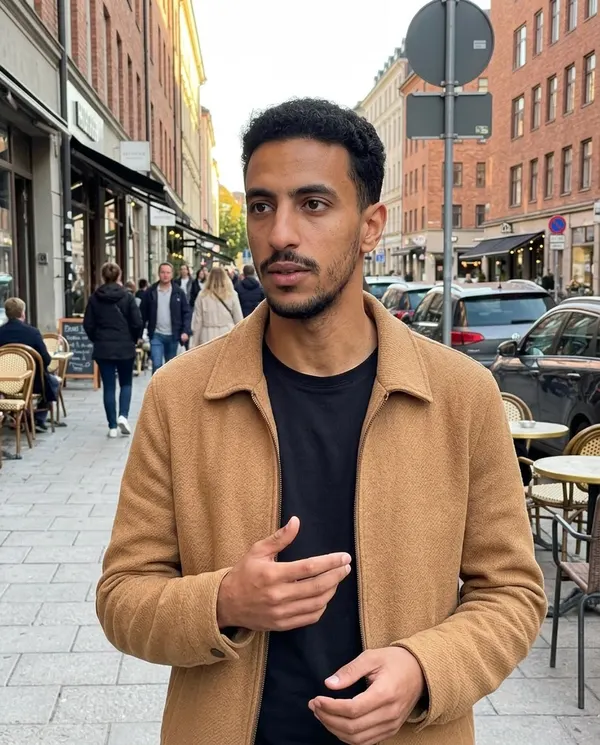
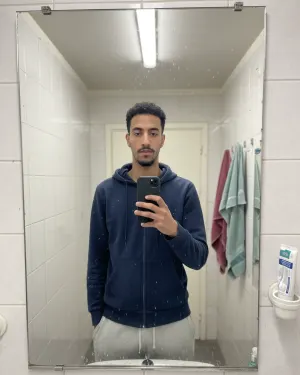
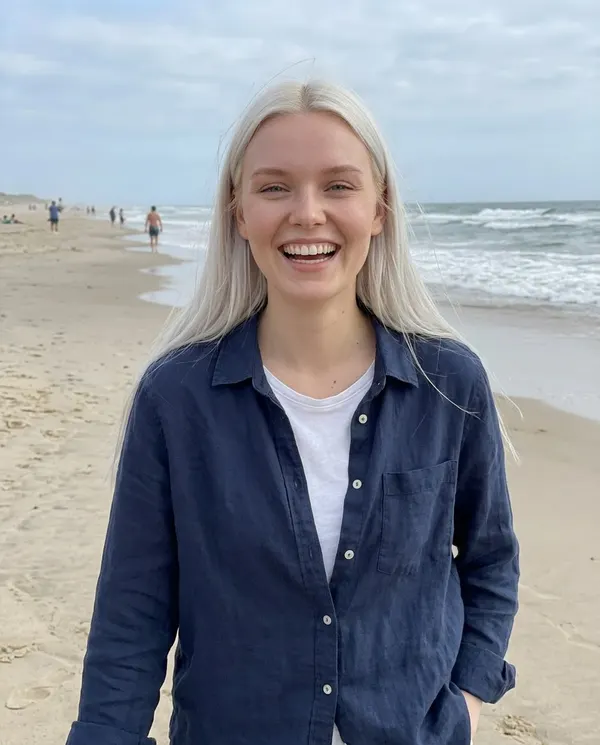
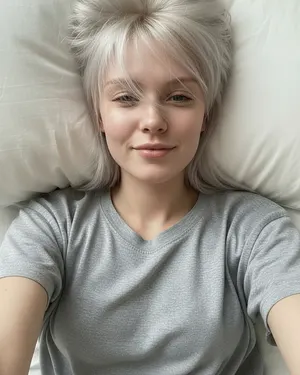
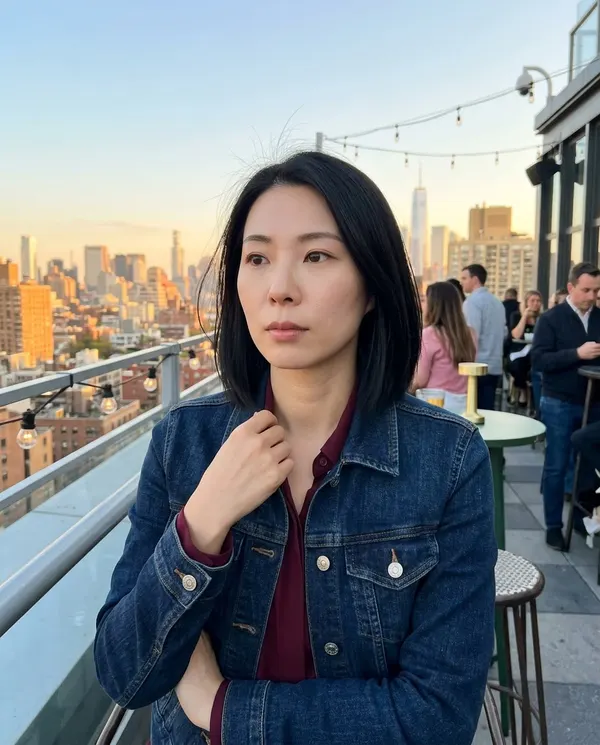
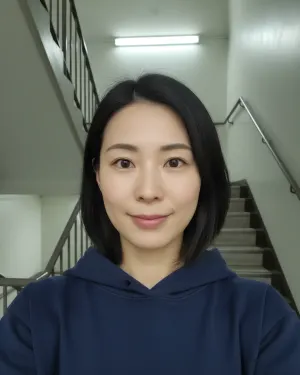
Is it the AI, or your mirror?
Sometimes the AI got it right and your eyes are the problem. You know your face from the mirror, which is flipped, and from close front-camera selfies, which distort. A photo with normal proportions can feel off to you and look completely normal to everyone else. (The research behind this is in no good photos for dating apps.)
Quick check: flip the photo horizontally in your phone's editor. If it suddenly looks like you, the photo was fine all along. Then ask someone else, because other people see your unflipped face every day.
How to get AI photos that look like you
Take fresh, sharp, boring selfies. Boring is good. The AI adds the scene, so your selfies only need to carry your face.
- 1
Shoot them today
Same hair, same beard or makeup, same glasses you'll have on the date. Old favorites teach the AI an old version of you.
- 2
Face the light
Stand facing a window or in open shade. No overhead bulbs, no flash, no sun behind you.
- 3
Step back
Arm's length at minimum, phone at eye level. Better still, prop the rear camera on a shelf and use the timer.
- 4
Kill every filter
Beauty mode, portrait smoothing, app filters, the soft-skin setting some phones switch on by default. All off.
- 5
Vary the angle, not the look
Front, slightly left, slightly right. Mix a neutral face with a real smile. Tools ask for different numbers of selfies: MainPic asks for 3, others for more.
- 6
Add a full-length photo if it's accepted
Without one, the tool has to guess your height and build from your face.
The full routine, with lighting and phone-angle examples, is in our selfie guide for AI photos.
The four-pass check before you post
Ten minutes, and it saves you from a match squinting at you across the table.
- Thumbnail pass. Look at each photo at the size the app shows it. Does it read as you in one second?
- Zoom pass. Go to 200% on the face, hands and edges. Use the red-flag table below.
- Set pass. Put all your picks side by side. Face shape, nose and hairline should match in every one. A face that changes between photos is the biggest giveaway.
- Friend pass. Send six photos, real and AI mixed, to a friend who knows your face. Ask which ones look least like you, and delete what they pick.
The set pass is the one people skip. In a December 2025 TikTok covered by the Daily Dot, a woman explained why a Bumble match's photos looked AI-made to her: most were unnaturally smooth, and his face seemed to change from one photo to the next.
Once you have a shortlist, the free dating photo score gives a quick technical check (light, sharpness, size) in your browser, and the Tinder photo ranker helps you order them.
If your camera roll is the problem, try realistic AI profile photos made from your own selfies.
Red flags of fake-looking AI photos
Check these on every photo. One clear flaw is enough to delete it, because a match who spots it starts doubting the rest of your profile.
| Where to look | Red flag |
|---|---|
| Hands | Extra or fused fingers, fingers melting into a cup, a ring floating off the skin |
| Teeth | Too many, too even, or one solid white strip |
| Skin | No pores, no texture, a waxy shine |
| Eyes | Different reflections in each eye, odd pupils, eye color that changes |
| Hair | Strands dissolving into the background, a hairline that isn't yours |
| Tattoos, moles, scars | Missing, moved, mirrored or turned into scribbles |
| Jewelry and glasses | Mismatched earrings, frames bending into the face, chains merging with skin |
| Text | Garbled letters on signs, menus, T-shirts or book covers |
| Background | Bent lines, impossible buildings, blurry faceless people |
| Light | Your face lit from a different side than the rest of the scene |
| Body | Taller, slimmer or broader than you are |
Tattoos deserve a second look. A match will probably ask about yours, and a tattoo that's mirrored or missing is a strange thing to explain on a first date.
Expect to delete some. When Vice tested an early AI selfie service in 2022, 12 photos of an editor turned into 78 images that looked impressive at first glance, and the writer noted that every one had small flaws once you looked closely. Tools have improved a lot since. The habit of checking hasn't gone out of date.
How close to you should AI photos be?
Close enough that nothing about you changes. The bar I use: your photos should look like you at the restaurant door, not like you after two hours of hair, makeup and retouching.
The apps draw the same line. Hinge's AI principles say that if you include generative AI images, they "should not be used to misrepresent yourself or your intentions". Its March 2026 dating guide goes further and tells daters to skip AI-generated profile photos, saying 88% of Hinge daters are uncomfortable with them. Bumble lets members report a profile they think uses AI-generated photos. And a Brooklyn dating consultant interviewed by CBS News in 2026 supports AI on clients' photos only as long as they still accurately show who they are: "I can't work with you if you want to not represent yourself accurately."
So the honest setup is AI to fill the gaps, plus one or two real photos, with nothing that changes your face.
This isn't new, either. Back in 2019, before AI photos took off, 70% of the 2,000 US singles surveyed by Plenty of Fish called face filters deceptive. An AI result that changes your face is a filter with better marketing.
Do
- Change the light and color
- Change the background, if it's a kind of place you go (a coffee shop, a trail)
- Change the outfit, if you own something like it
- Improve posture and framing
Don't
- Change your face shape, nose, jaw or eyes
- Change your age
- Change your weight, height or build
- Add skin, hair or tattoos you don't have
- Show a lifestyle you don't live
That's the bar MainPic is built around, and it's why the first step is 3 free watermarked photos of your own face: you check the likeness before you pay. If you buy and none of your photos look like you, email us within 14 days: we redo them free, and if they still don't, we refund you in full. Get 3 free photos and judge the likeness yourself. Whatever tool you use, hold it to the same bar.
What if none of the AI photos look like you?
Don't keep hitting generate. Fix the input first.
- Reshoot your selfies with the steps above. This solves most cases.
- If fresh, sharp, unfiltered selfies still give you a stranger, the tool is the issue. Ask for the redo or refund it promises, if it promises one.
- Try a different tool. Our roundup of AI dating photo generators compares what they do.
- Or skip AI for now. Daylight, a patient friend and the tips in candid dating profile photos will get you further than photos of someone else.
Women get a few extra failure modes (smoothed skin, loosened curls, slimmer faces): see AI dating photos for women.
 Written by Wasim · MainPicAbout MainPic →
Frequently asked questions
Do AI dating photos really look like you?
The good ones do, but not every result will. Expect a mix: some clearly you, some slightly off, some a stranger. Sharp, recent, unfiltered selfies raise the share of good ones, and you only post those.
Why does my AI photo not look like me?
Usually the selfies: filters, close-up distortion, old photos, sunglasses or one repeated angle. Sometimes the tool pulls your face toward a generic model. Reshoot first, and if that doesn't fix it, change tools.
Can people tell if your dating photos are AI?
They can spot bad ones: waxy skin, odd hands, garbled text, a face that changes between photos. A natural result that looks like you, mixed with real photos, is far harder to pick out.
Will AI photos pass photo verification on Tinder or Hinge?
Both apps scan your face in a video selfie and check it against your profile photos. Photos that keep your real face give it the same person to compare. Photos that changed your face give it someone else, which is what verification is built to catch.
Is using AI dating photos catfishing?
Not if they look like you and show a life you live. It becomes catfishing when the photo changes your face, age or body, or invents a lifestyle, because your match agrees to meet someone who doesn't exist.
How many selfies do I need for realistic AI photos?
It depends on the tool: MainPic asks for 3, others for more. Quality matters more than count: recent, sharp, evenly lit, unfiltered, just you, with a few slight angle changes.
Sources
- Rutgers: Selfies drive self-image and may lead many to seek plastic surgery
- Daily Dot: Woman spots AI tells in Bumble photos
- Vice: AI can now make fake selfies for your Tinder profile (2022)
- FOX 10: Plenty of Fish bans face filters (2019)
- Hinge: AI principles
- Hinge Newsroom: AI dating guide (March 2026)
- TechCrunch: Bumble adds an option to report AI-generated profiles
- CBS News: Dating apps, AI photos and authenticity
- Tinder Help Center: How does Photo Verification work?
- Hinge Help Center: What is Selfie Verification?
Keep reading
AI Dating Photos for Women: Natural, Safe, Still You
AI dating photos for women: when they help, how to keep them natural, what to delete, and how to protect your selfies and privacy before you upload.
Read the guide →TinderProfile.ai Alternatives (2026): 5 Tools Compared
TinderProfile.ai alternatives for Tinder, Hinge and Bumble photos, compared on price per photo, free previews, refunds and how long your selfies are kept.
Read the guide →Photo AI Alternatives for Dating Photos (2026)
Want a Photo AI alternative for Tinder, Hinge or Bumble? What Photo AI really costs, its refund rule, and 5 dating tools compared. Checked November 2026.
Read the guide →