Tinder No Profile Picture: Can You Use Tinder Without One?
Can you use Tinder with no profile picture? What Tinder's rules say, why a match suddenly shows no photo, and how to fix uploads that fail.
9 min read
In this article
Quick answer
Not really. Tinder's help center says at least one face photo is required in many regions, and when Tinder can't detect a valid face photo, your profile is hidden: nobody sees you, though you can still chat with matches you already have. If a match's photos won't load, Tinder suggests logging out and back in; if the match vanished, it says they most likely unmatched or deleted their account.
People type "tinder no profile picture" for three very different reasons. Some want to swipe without showing their face. Some just watched a match turn into a gray blank. And some are stuck on an upload screen that won't take their photo.
All three get answered below, with what Tinder's own help pages say (checked in November 2026), not what a forum thread guessed. Then the part most people actually need: what to put up when you don't have a photo you like.
Can you use Tinder without a profile picture?
You can open the app. You can't really use it. Tinder's help center says users are required to upload at least one face photo in many regions, and that the requirement is still rolling out to more countries. When Tinder can't detect a valid face photo on your profile, it hides the profile.
Here is what "hidden" means, per Tinder:
- Nobody sees you. Your profile doesn't show up for other people on Tinder.
- Features switch off. Tinder lists Likes, Super Likes, Boost and Super Boost among what you lose while hidden.
- Your inbox survives. You can still open Settings and chat with the matches you already have.
So a no-photo profile is a profile that only exists for you. It won't get a single new match, and it can't even send a Tinder Super Like, since Tinder switches Likes and Super Likes off until it detects a face photo.
What counts as a valid face photo
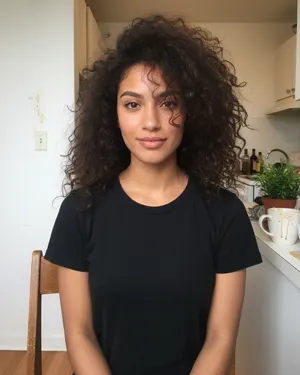
Tinder asks for a clear view of your full face. Well lit and close up works best. Anything covering your face, like a mask, your hand or your phone, can make the photo fail. Tinder also says its face detection only roughly checks that a face is there, so this isn't a beauty filter. It's a "is there a human face here" check.
Example: 1 selfie in, profile photos out





Why does a Tinder match show no picture?
You open your matches and someone's photo is gone. Before you spiral, here is what Tinder's help center actually explains, and what it doesn't.
| What you see | Most likely reason | What to do |
|---|---|---|
| A match's photos won't load | Tinder doesn't give a cause; it suggests a fix | Log out and back in. If that fails, Tinder says it's probably a technical issue on its side |
| One match vanished from your list | Tinder says they most likely ended the match or deleted their account | Nothing. Tinder says unmatching is permanent |
| All your matches vanished at once | Tinder says this can be temporary | Try again later, then log out and back in |
| Matches load forever | Connection or app problem | Switch between Wi-Fi and mobile data, reinstall the app, or try Tinder.com |
| A blank profile messaging you first | Tinder doesn't document this case | Be careful, report it if it asks for money or links |
Two details worth knowing. Tinder says the person who gets unmatched isn't notified, so a disappearing match is usually the only signal you'll get. And a ban can't be confirmed from the outside: Tinder tells banned users by email and at login, not their matches.
If someone without a single clear photo pushes you to move to another app, send money or click a link, treat that as a red flag no matter what the reason for the blank profile is.
Your photo won't upload or keeps getting rejected
Two different problems hide behind the same frustration. Either the file never makes it to Tinder, or it makes it and your profile still stays hidden.
The upload fails
- 1
Check your connection
Tinder's own advice for photos and bio changes that don't save starts here: make sure your connection is strong.
- 2
Delete and reinstall the app
Tinder says this puts you on the latest version and refreshes the app.
- 3
Check photo access on your phone
In your phone's settings, make sure Tinder is allowed to access your photos, or at least the ones you picked.
- 4
Try a simpler file
If one photo fails and others work, convert it to a plain JPG with our free image converter (it reads WebP, AVIF, GIF and PNG, which is what saved web images often are) and try again. Tinder doesn't publish a format list, so this is a cheap test, not a known rule.
- 5
Contact Tinder
If nothing works, Tinder asks you to report the issue with as much detail as possible.
The photo uploads, but your profile is still hidden
That means Tinder didn't find a usable face. The usual suspects: sunglasses plus a cap, a face too small in the frame, a dark bar photo, a hand or drink in front of your face, or a group shot. Upload a recent, close, well-lit solo photo and make it your first one. Tinder says that if your photo meets the requirements and your profile is still hidden, you should contact them.
One more case: a photo that uploaded fine and later disappeared. Tinder's help center says a removed photo or video means it detected a violation of its Terms of Use, and points you to the Community Guidelines before you upload again.
Short on good pictures? Here's how AI Tinder pictures work, made from your real face.
Can you hide your face for privacy?
Wanting to stay low-key is fair, especially if you work with the public. But in regions with the face photo rule, a faceless profile simply doesn't show. Tinder's help center does say it will consider exceptions for legitimate religious and safety reasons, through its contact form. It also suggests blocking people or going Incognito to control who sees you; Incognito is listed as a Tinder Plus feature, so it's paid.
For everyone else, the realistic middle ground is to show your face and hide everything else: no work badge, no company logo, no street sign outside your building, no photo that also lives on your public Instagram.
Photo Verification and Face Check, in plain English
Tinder has two face checks, and people mix them up.
- Photo Verification is the blue checkmark. You record a short video selfie, Tinder checks you're a live person, and you get the Photo Verified badge if your profile includes a clear solo face photo that matches the face in the video. Tinder says it's optional, and that it keeps your face data so it can keep checking as you change your photos.
- Face Check is the mandatory version. Tinder's Face Check FAQ says users where it applies are required to complete the scan, and that it's rolling out on a phased basis where local regulations permit, so whether you see it depends on where you live. The video selfie is deleted after review, but Tinder keeps two audit images and your face map and face vector for the life of the account.
Either way, the message is the same: Tinder now compares your face with your photos. A profile with no face, or with photos that don't look like you, is exactly what these checks are built to catch. Tinder's Community Guidelines say it plainly: don't pretend to be someone you're not.
The real problem: you don't have a photo you'd put up
A lot of people asking "can I use Tinder without a picture" have a picture. They just hate all of them. One clear face photo is enough to make your profile visible. Getting matches takes more: the guide to how many photos to use on Tinder suggests five or six, and Tinder pictures and dating profile pictures cover how to pick the rest once your face photo passes.
- Let Tinder dig for you. Tinder's Photo Selector is an on-device tool that scans your camera roll for photos that could work as profile pictures. Its help page says it's available on iOS and Android globally, though users in Australia, Brazil, Canada and Thailand may see a test version called "Finding your best photo" instead.
- Search your phone and your friends' phones. The guide on what to do when you have no good photos walks through face search on iPhone and Google Photos, event galleries and the text to send friends.
- Shoot one solo session. A window, a phone propped at eye level, the back camera and a 10-second timer. The full method is in how to take dating photos by yourself.
- Pick a strong opener. Your first photo is the one Tinder checks for a face and the one people judge in a second. See the best first photo for dating apps, then rank your shortlist with our free Tinder photo ranker.
Still short? That's the gap we built MainPic for. You upload 3 selfies and get photos of yourself in real-life scenes like a coffee shop, a city street or a rooftop. You can get 3 free photos from 3 selfies, no card, and decide if they look like you before paying anything.
Is that allowed on Tinder? Read our breakdown of AI dating photos on Tinder, Hinge and Bumble. The rule: only post results a friend would recognize instantly, keep at least one real photo, and make sure the solo face photo you lead with still looks like you on camera, because that's what verification compares.
Do
- Lead with a clear, recent solo face photo
- Keep your full face visible: no mask, hand or phone in front
- Verify once your photos are in place
- Add four or five more photos that show your life
Don't
- Wait for a no-photo profile to get matches: it's hidden
- Use a group shot or a sunglasses photo as your only picture
- Post photos that don't look like you today
- Reinstall endlessly when the real issue is the photo
 Written by Wasim · MainPicAbout MainPic →
Frequently asked questions
Can you have a Tinder account with no pictures?
You can have the account, but in many regions Tinder hides profiles without a valid face photo. Hidden profiles aren't shown to other people, so you won't get new matches. You can still chat with existing matches.
Why does my Tinder match have no picture?
Tinder's help center says that when one or a few matches disappear, the person most likely ended the match or deleted their account. If all your matches vanish at once, Tinder says it can be temporary and suggests logging out and back in.
Why is my Tinder profile hidden?
Usually because Tinder can't detect a valid face photo. Add a clear, well-lit photo of your full face with nothing covering it. If your photo meets the requirements and you're still hidden, Tinder asks you to contact support.
Why won't Tinder let me upload a picture?
Tinder's own advice is to check that your connection is strong, then delete and reinstall the app to get the latest version. Also check that Tinder has permission to access your photos. If it still fails, contact Tinder with details of the problem.
Is Tinder photo verification required?
Photo Verification, the blue checkmark, is optional according to Tinder's help center. Face Check is different: Tinder's FAQ says users are required to complete it where it applies, and it's rolling out in phases where local regulations permit.
Can I use Tinder without showing my face for religious or safety reasons?
Tinder's help center says it's willing to consider exceptions to the face photo rule for legitimate religious and safety reasons. Contact Tinder through its help center and explain your situation. Without an exception, a profile with no face photo stays hidden in regions with the rule.
Sources
- My profile is hidden (Tinder Help Center)
- Problems with Matches (Tinder Help Center)
- Unmatching someone (Tinder Help Center)
- My account is banned (Tinder Help Center)
- Updates to your bio, photos, or Spotify Anthem not sticking? (Tinder Help Center)
- How Does Photo Verification Work? (Tinder Help Center)
- Face Check scan FAQ (Tinder)
- Age Checks at Tinder (Tinder Help Center)
- What's Photo Selector? (Tinder Help Center)
- Community Guidelines (Tinder)
- Why was my photo or video removed from Tinder? (Tinder Help Center)
- Finding your best photo (Tinder Help Center)
- Tinder subscriptions (Tinder Help Center)
Keep reading
Tinder Shadowban: What Tinder Says, Signs and Fixes
Is a Tinder shadowban real? What Tinder's help center says about hidden profiles, reviews, bans and appeals, plus the signs and safe fixes.
Read the guide →Tinder Bios: 70 Examples for Guys and Girls (+ Funny Ones)
70 Tinder bio examples for guys and girls: funny, short, serious and by hobby, plus Tinder's own 15 to 45 word advice and a 4-step method.
Read the guide →Tinder First Message: 60 Examples Better Than 'Hey'
Tinder first message examples that get replies: 60 openers based on photos, bios and prompts, a 3-part method, follow-ups, and what Tinder's rules allow.
Read the guide →