Can You Send Pictures on Hinge? What to Do Instead
No: Hinge chat has no photo button. What you can send (text, emoji, Voice Notes), the safety rules, and how to show a match a picture anyway.
8 min read
In this article
Quick answer
No. Hinge chat has no way to attach photos or videos: you can send text, emoji and Voice Notes, like a message or reply to it, and voice and video calls were removed. To show someone a picture, put it on your profile, describe it in a Voice Note, or send it on another app once you trust the person.
There's no camera button and no gallery button, and I went through Hinge's own help center to make sure nothing hides elsewhere (last checked: November 2026). Below: what the chat does today, how to show a match something anyway, and why the pictures that matter are the ones already on your profile.
What you can send in Hinge chat
| Thing you want to send | In Hinge chat? | What Hinge's help center says |
|---|---|---|
| Text messages | Yes | Open a match in your Matches list and type. |
| Emoji | Yes | Listed with messages as something you can send. |
| Like or reply to a message | Yes | Press and hold (or swipe right on) a message to reply with a quoted preview. Double-tap no longer sends a heart. |
| Voice Notes | Yes, after you match | Tap the microphone, record, play it back, then send or tap X to redo. |
| Photos from your camera roll | No | No attachment option is described anywhere in the chat help. |
| GIFs | Not documented | Hinge's chat help doesn't mention GIFs. Check your own chat bar. |
| Videos | Not in chat | Video lives on your profile: you can add one Video Prompt. |
| Voice or video calls | No, removed | Hinge removed Voice and Video Calling and points people to Voice Notes and messaging. |
| Links to other sites | Avoid | Hinge's content rules list "linking out to other websites or payment platforms" under unsolicited promotions. |
Paying won't change it. Hinge's subscription page lists unlimited Likes, seeing all your Likes at once, unlimited undo skips, advanced filters, more visibility and priority Likes. Photo messaging isn't on the list for any tier. Tinder is the same story, though its chat at least has GIFs: see can you send pictures on Tinder.
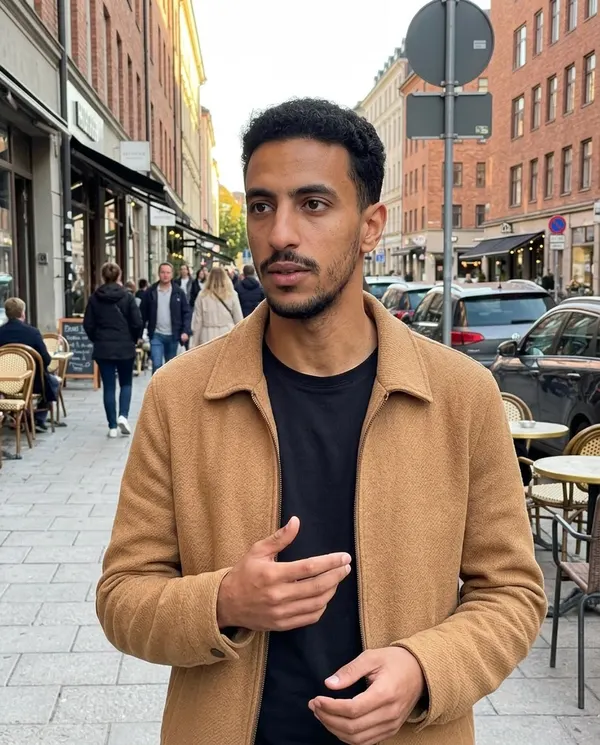
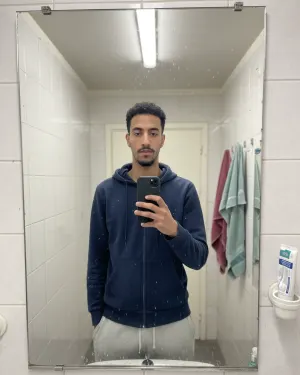
Example: 1 selfie in, profile photos out




Why there's no photo button
Hinge doesn't explain the choice anywhere I could find, so this part is my read, not theirs. Look at what its rules spend the most words on: no nudity or sexually explicit imagery "on your profile or in chats", no unsolicited sexually explicit messages, no links out, no scams. An image button would be the easiest way to break every one of those rules in one tap.
There's product logic too. Hinge puts the pictures on your profile, where they're moderated and everyone sees the same thing. The chat is for talking and setting up a date: with Your Turn Limits, people who leave too many matches waiting can't send or receive new Likes until they reply or close some chats.
How to show a match a picture anyway
- 1
Put it on your profile for a day
Swap one photo for the one you want them to see, then tell them "check my last photo". Everyone who visits your profile will see it too, so only do this with pictures you'd show anyone. You need four to six photos depending on where you live, so add the new one before you remove an old one (how to swap a photo on Hinge). If Top Photo is on, Hinge may move it around.
- 2
Post it as a Passing Thought, if you have it
Hinge is testing Passing Thoughts: a few words in answer to one of the week's prompts, with an optional photo, shown as a card on your profile that disappears after 7 days. That's the closest thing Hinge has to a temporary photo. If you don't see it in your profile editor, your account isn't in the test.
- 3
Pair it with a photo prompt
Hinge lets you attach a prompt to any photo. "My dog, judging you" next to the dog picture you wanted to send does the job and stays useful for every future match.
- 4
Describe it in a Voice Note
Twenty seconds of you laughing about your terrible pottery bowl beats a photo of the bowl. Voice Notes are the richest thing Hinge chat allows.
- 5
Save it for the date
"I'll show you the bowl on Saturday" is a photo, a joke and a date ask in one line.
- 6
Move to another app once you trust them
If you want to keep chatting with pictures, ask for their number or Instagram after a real back and forth. Not in the first five messages: Hinge's safety advice is to keep conversations on Hinge while you get to know someone, because its Safe Message Filters don't follow you off the app.
Do
- Wait for a few real exchanges before moving off the app
- Ask before sending anything personal on another app
Don't
- Paste a Google Photos or Drive link into the chat: Hinge's content rules list linking out to other websites under unsolicited promotions, and links from strangers look like phishing
- Send anything sexual, on Hinge or after you move apps, without a clear yes
- Trust someone who wants to leave Hinge in the first few messages: Hinge flags it as a scammer move
Short on good pictures? Here's how AI Hinge pictures work, made from your real face.
Safety features in Hinge chat worth knowing
What Hinge describes today:
- Are You Sure? If a message you write contains potentially harmful language, Hinge asks you to reconsider before it goes out. It doesn't block the message.
- Comment Filter. Likes with comments that contain disrespectful language (Auto Filter is on by default), or words you add to your own block list, land in Hidden Likes without a notification. The sender isn't told. It's in Settings, then Safety.
- Safe Message Filters. Automated tools scan interactions for harmful or illegal behavior, and trained moderators review what gets flagged.
- Screenshot blocking (some regions). Discover, Standouts, Likes You and other people's profiles can't be screenshotted there. Your chats can, so you can report something that makes you uncomfortable.
- Reporting. Tap the three dots on a profile or chat, then Report. It's confidential, and that person disappears from your view.
- No unsend. Single messages can't be deleted. Unmatching removes the whole conversation, permanently. Listen to your Voice Note before you hit send.
On privacy: a help page Hinge published in November 2026 describes Chat Insights, which uses OpenAI to look for patterns in your chats. You can switch it off in Settings; chat and the safety checks keep working.
The pictures that count on Hinge are already on your profile
This matters more than the missing button. On Hinge, people Like or comment on one specific photo or prompt, and that comment is usually the first message. The conversation starts from your profile pictures before anyone opens the chat.
Hinge's own feature design says the same. Its Convo Starters, live in some regions, read your photos and prompts and suggest opener ideas to the person liking them, but they skip selfies and group photos on purpose. Hinge also says 72% of daters are more likely to consider a match when the Like comes with a message. A bathroom selfie gives that person, and Hinge's own tool, nothing to work with.
What I'd check in your photo slots:
- A clear solo face photo first. Hinge's guidelines require at least one photo that clearly shows your face.
- At least two photos with a story in them. Your dog, a dish you cooked, a trail, a trip. If you don't have those, our style pages show what they look like: with your dog, cooking, traveling.
- Recent and honest. Hinge calls misleading or outdated photos unfair to the community, and it bans AI-generated content used to mislead. AI photos that look like you today are a different question, covered in are AI dating photos allowed.
- Prompts that pair with the photos. Three prompt answers are required. A prompt that sets up the photo next to it gives people two things to comment on. Stuck? Try our Hinge prompt generator.
The full six-photo plan, with what to put in each slot, is in the Hinge photo tips guide. If the honest problem is that your camera roll has nothing but selfies, you can get 3 free photos from three selfies and see whether any of them belong in that grid. Just know that Hinge's own guide to using AI in dating tells daters to skip AI-generated profile photos (88% of Hinge daters are uncomfortable with them). If you use any, use them for one or two shots and keep them exactly like you.
Lines that do the job of a photo
When you catch yourself typing "let me send you a pic", send one of these instead. Each one invites a reply instead of waiting for an attachment that won't go through:
- "Hinge won't let me send you my dog's face right now, which is a shame, because it's ridiculous. Describe your pet in three words and I'll do mine."
- "I'd show you the view from this hike but this app has decided we must use words. So: best trail you've done?"
- "I just made the ugliest lasagna of my life. I'll describe it in a Voice Note if you promise not to judge."
Want more in that tone? Our dating opener generator writes them from a match's profile, and how to get more matches covers the profile side.
 Written by Wasim · MainPicAbout MainPic →
Frequently asked questions
Can you send pictures in Hinge chat?
No. Hinge's help center describes text, emoji, liking and replying to messages, and Voice Notes. There's no option to attach a photo from your camera roll.
Can you send GIFs on Hinge?
Hinge's chat help doesn't mention GIFs at all. If your chat bar has no GIF button, your version doesn't support them.
Can you send videos on Hinge?
Not in chat, and Hinge removed voice and video calling. You can add one Video Prompt to your profile, which every visitor can watch.
Does HingeX let you send photos?
No. Hinge+ and HingeX add things like unlimited Likes, filters and more visibility. Photo messaging isn't part of any plan.
Can you send voice messages on Hinge?
Yes, once you've matched. Tap the microphone in the chat, record, listen back, and send. Your match can replay it at 0.5x to 2x speed.
Can you send links on Hinge?
Hinge's chat help doesn't say links are blocked, but its content rules list "linking out to other websites or payment platforms" under unsolicited promotions. A link to your photos from someone you just matched also looks like phishing, so wait until you've moved to another app.
Sources
- Hinge Help: How Do I Match with Someone and Start Chatting?
- Hinge Help: What are Voice Notes?
- Hinge Help: What happened to the Voice and Video Calling feature?
- Hinge Help: Subscription and Purchase Benefits
- Hinge Help: Prohibited Content & Behavior
- Hinge Newsroom: Hinge's Guide to Using AI in Dating (March 5, 2026)
- Hinge Help: Community Guidelines
- Hinge Help: What is "Your Turn Limits"?
- Hinge Help: Safe Dating Advice
- Hinge Help: Protect yourself and other daters from scammers on Hinge
- Hinge Help: What is Are You Sure?
- Hinge Help: What is Comment Filter?
- Hinge Help: Safe Message Filters
- Hinge Help: Screenshot Blocking (Select Regions)
- Hinge Help: I need to report something that happened on Hinge
- Hinge Help: Can I delete a message?
- Hinge Help: What are Chat Insights?
- Hinge Help: What are Convo Starters?
- Hinge Help: How do I edit my Prompts?
- Hinge Help: What is Top Photo?
- Hinge Help: How do I edit my profile?
Keep reading
How to Delete a Photo on Hinge: Steps, Fixes, Top Photo
How to delete a photo on Hinge: the exact path, why the app blocks you at the photo minimum, how to swap and reorder photos, and what Top Photo changes.
Read the guide →Hinge Profile Pictures: How to Pick 6 That Get Comments
Hinge profile pictures that get comments, not just likes: the 6-photo plan, which photo leads, how to pair photos with prompts, and Hinge's own rules.
Read the guide →Hinge Algorithm 2026: How It Works and What You Control
How the Hinge algorithm works in 2026, from Hinge's own pages: deep-learning picks, dealbreakers, skips, Top Photo, the Elo myth and tips that help.
Read the guide →