Hinge Boost: How Long It Lasts and Does It Work?
Hinge Boost lasts 1 hour, Superboost 24 hours. What Hinge says it does, how to buy it, HingeX, best time (user reports) and what to fix first.
8 min read
In this article
- 1.Hinge Boost vs Superboost at a glance
- 2.What a Hinge Boost actually does
- 3.How long does a Hinge Boost last?
- 4.How to buy and use a Boost on Hinge
- 5.Is Boost included in Hinge+ or HingeX?
- 6.Does Hinge Boost work?
- 7.Fix your photos and prompts before you pay
- 8.Best time to Boost on Hinge
- 9.Boost, Rose or Standouts?
Quick answer
A Hinge Boost shows your profile to more people for one hour, and a Superboost does the same for 24 hours. You buy and start both from the Likes You screen; they aren't included in Hinge+ or HingeX, and Hinge promises visibility, not matches. A Boost only multiplies what your photos and prompts already do, so fix those before you pay.
Boost is one of the few things Hinge sells where you can check the result yourself: every like it brings in gets a small lightning bolt next to the name. That makes it easy to judge, and just as easy to waste if the profile people land on isn't ready for the extra traffic.
Hinge Boost vs Superboost at a glance
| Boost | Superboost | |
|---|---|---|
| How long it lasts | 1 hour | 24 hours |
| What it does | Makes your profile visible to more people | Same thing, for a full day |
| Where to buy and start it | Boost button on the Likes You screen | Same button |
| When it starts | Right away: if you own one, tapping the button activates it | Same |
| Do other people know? | No, nobody is notified | No |
| How you track results | A lightning bolt next to likes and matches it brought in | Same |
| Included in Hinge+ or HingeX? | No | No |
| Refundable? | No, Hinge calls Boost purchases final | No |
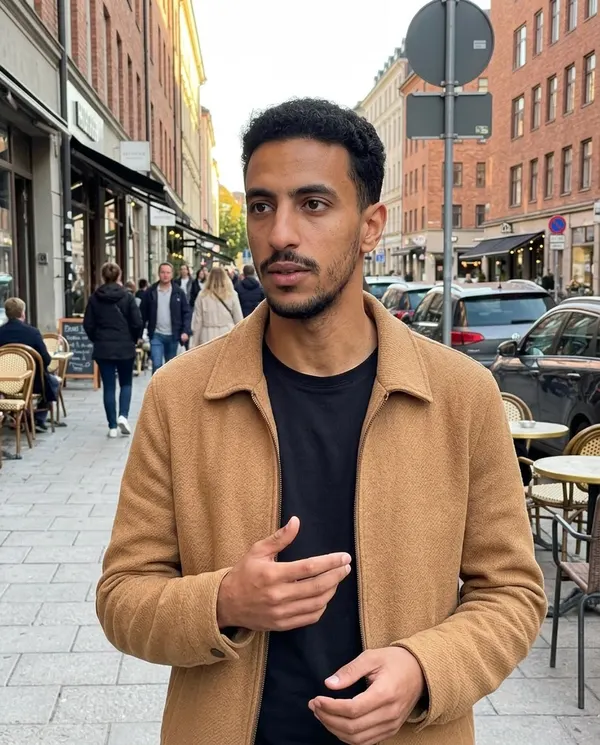
Example: 1 selfie in, profile photos out





What a Hinge Boost actually does
Hinge pitches it as a way to get noticed faster: for the length of the Boost, your profile is shown to more people. That's it. Same photos, same prompts, same person on the other end deciding whether to like you.
The useful part is the scoreboard. Hinge puts a small lightning bolt next to the name of anyone whose like came from your Boost, and another one if that like turns into a match. So you don't have to guess whether it worked. Count the bolts.
Two things Hinge doesn't document: whether a Boost puts you in Standouts, and whether it reaches people whose filters exclude you. For HingeX's always-on version, Hinge says it won't override other daters' preferences. My assumption is that Boost doesn't either. If you're outside someone's age range, no amount of Boost gets you in front of them.
How long does a Hinge Boost last?
One hour from the moment you activate it. A Superboost lasts 24 hours. While it runs, the Boost button turns into a countdown showing the time left.
Watch out for one detail: Hinge says that if you already own a Boost, tapping the button activates it instantly. Its Help Center doesn't describe any way to schedule, pause or cancel one. So don't tap it at 7 a.m. on your commute just to see what it does.
How to buy and use a Boost on Hinge
- 1
Open Likes You
The Boost button sits on the screen with your incoming likes.
- 2
Buy one
If you don't own a Boost yet, tapping the button opens the purchase screen, with the options and prices for your country.
- 3
Start it when you're ready
Once you own a Boost, the same tap starts it immediately. Hinge says you can buy another once your last one is used.
- 4
Count the lightning bolts
Every like and match that came from the Boost gets a bolt next to the name. That's your result.
How much does a Hinge Boost cost?
Hinge's Help Center doesn't list Boost prices, and the US App Store lists Hinge's in-app items without saying which one is a single Boost, a pack or a Superboost. I'd rather not guess a number for you. Hinge shows the price on the purchase screen when you tap the Boost button, in your own currency, so read it there before you confirm. Once you pay, it's final: Hinge says Boost purchases are nonrefundable.
Is Boost included in Hinge+ or HingeX?
No. Hinge's plan comparison doesn't include Boosts in either subscription, and lists Boosts and Roses as separate purchases.
What HingeX gets instead is a feature called Get Seen by More Daters. Hinge describes it as a light but always-on version of Boost that pushes you toward the top of Discover feeds for as long as you're subscribed. Hinge also says a real Boost may rank you even higher during its hour or day. Hinge+ has no visibility perk: it's unlimited likes, seeing all your likes at once, advanced filters and unlimited undo skips.
Short on good pictures? Here's how AI Hinge pictures work, made from your real face.
Does Hinge Boost work?
Hinge only promises visibility. Its Help Center says more people see you and gives no numbers on likes, matches or dates. The "11 times more people" figure on a lot of blogs goes back at least to a 2022 guide that credits Hinge's in-app Boost screen. I couldn't find it on any Hinge page today, so I don't repeat it as fact.
User reports are all over the place. Some people describe a burst of likes in the first hour; others pay and see one or two bolts. Those are Reddit threads and blog anecdotes with tiny samples, so read them as stories, not data.
My take: Boost is an amplifier. It multiplies what your profile already does. If 100 people see you on a normal day and nobody likes you, showing you to more people mostly gets you more silent passes. If your profile already pulls a steady trickle of likes, a Boost can turn that trickle into a busy evening.
Fix your photos and prompts before you pay
Hinge's own "Why aren't I getting any matches?" page puts photos first, so before you pay, check your grid against Hinge's list of photos that get more and fewer likes. Then work through this, in this order:
- First photo: you alone, face clear, smiling, no sunglasses. Score your options with our free dating photo score and keep the winner on top.
- One interest photo: Hinge says interests and sports photos do better. A hiking shot or a tennis photo also hands people an easy comment.
- Prompts worth commenting on: generic answers waste the traffic you're paying for. Stuck? Try our Hinge prompt generator.
- Re-verify after photo changes: Hinge warns that changing photos can cost you Selfie Verification, and losing it switches off your Signals badge. Swap photos first, verify again, then Boost.
- Loosen soft filters: Hinge suggests widening preferences or allowing profiles outside them. More people in your pool means more people a Boost can reach.
No photo that passes step 1? You can get 3 free photos made from 3 selfies and see if one earns a place in your grid. Know what Hinge itself says first: its AI dating guide (March 5, 2026) tells daters to skip AI-generated profile photos, because "88% of Hinge daters are uncomfortable with them," and its rules ban AI content used to mislead. If you use any, use them for one or two shots, keep them exactly like you, and keep the real photos with friends: Hinge lists those among the photos that do better.
Best time to Boost on Hinge
Hinge doesn't publish peak hours or a recommended time. The advice you'll see most often on blogs and Reddit is Sunday evening, then weeknights around 7 to 10 p.m. local time, and none of it cites Hinge data on Boost timing. The logic is simply that most people are home and scrolling then.
What I'd actually go by:
- Boost when you can reply for the next hour. A Boost brings likes; answering them fast is what turns them into chats. Hinge's Signals badge also rewards follow-through, not just volume.
- Start with a 1-hour Boost, not a Superboost. A Superboost spends its 24 hours across dead hours too. Buy one only after a regular Boost brought bolts you were happy with.
- Free user? Expect a queue. Hinge says free members see one incoming like at a time, so a busy Boost hour turns into a list you work through one profile at a time.
- Test one variable at a time. Same time slot, new first photo, count the bolts. That beats any timing chart.
Boost, Rose or Standouts?
They solve different problems. A Boost brings people to you. A Rose puts your like at the top of one specific person's list. Standouts is the feed of profiles getting the most attention, and there a Rose is the only way to like someone.
My rule of thumb: if you get likes but not from people you're into, a Rose with a real comment beats a Boost. If your profile already converts and you just want more volume on a Sunday night, that's when a Boost earns its price.
 Written by Wasim · MainPicAbout MainPic →
Frequently asked questions
How long does a Hinge Boost last?
A Boost lasts one hour from the moment you activate it, and a Superboost lasts 24 hours. The Boost button on your Likes You screen shows the time left while it runs. Hinge's Help Center doesn't describe any way to pause, schedule or cancel one, so only tap it when you're ready.
How much does a Hinge Boost cost?
Hinge doesn't publish Boost prices in its Help Center, and the US App Store doesn't say which in-app item is which. Tap the Boost button on your Likes You screen: the purchase screen shows the price in your currency before you pay. Boosts are nonrefundable.
Is Hinge Boost worth it?
Only if your profile already gets likes on a normal day. Hinge promises more visibility, not more matches, so a Boost multiplies what your photos and prompts already do. If you get nothing without it, fix your first photo and prompts before paying, and try a 1-hour Boost before a Superboost.
Can people see if you Boost on Hinge?
No. Hinge says other users won't know you're being boosted. Only you see the small lightning bolt next to likes and matches that came from your Boost.
Does Hinge+ or HingeX include Boosts?
No. Neither plan includes Boosts. HingeX has Get Seen by More Daters, which Hinge describes as a light, always-on version of Boost for as long as you're subscribed. Hinge+ has no visibility feature.
What is the best time to Boost on Hinge?
Hinge doesn't publish one. Users and blogs most often suggest Sunday evening or weeknights around 7 to 10 p.m. local time, without Hinge data behind it. My advice: pick an evening when you can answer likes during the hour the Boost runs.
Sources
- Hinge Newsroom: AI dating guide (March 5, 2026)
- Hinge Help: What is Boost? (updated August 2026)
- Hinge Help: Subscription and Purchase Benefits (updated October 2026)
- Hinge Help: Subscriber Experience (Get Seen by More Daters vs Boost)
- Hinge Help: Why Aren't I Getting Any Matches? (photo research, updated July 2026)
- Hinge Help: Prohibited Content & Behavior (AI-generated content to mislead)
- Hinge Help: Is Hinge free?
- Hinge Help: How can I request a refund?
- Hinge Help: What is Signals?
- Hinge on the US App Store (in-app purchase list, November 2026)
- SwipeStats: Hinge Boost Explained (user reports on timing, 2026)
- Manly and Modern: Best Time To Boost On Hinge (2022 guide, the 11x in-app claim)
Keep reading
Hinge Most Compatible: What It Means and How It Works
Hinge Most Compatible explained: one free pick a day that expires in 24 hours, whether it's mutual, the Gale-Shapley question, and Standouts.
Read the guide →Hinge Prompt Answers: 86 Original Examples (2026)
86 original Hinge prompt answers for 28 real prompts, funny, sincere and serious, plus Hinge's data on which prompts lead to the most dates.
Read the guide →Hinge Standouts: How They Work and How to Get on Them
Hinge Standouts explained: what the star feed is, when it refreshes, why it takes a Rose, how people land in it, and what you can do to get there.
Read the guide →